Friday, May 18, 2012

Intro to Liquidware Amber, Part 2

First off, thanks to the wonderful folks over at Adafruit and Engadget for checking out the Amber! It’s been great hearing all the thoughts, feedback, and questions so far. While Mike and I get some of the projects and walkthroughs all documented, I’ll be posting them over the next week. In the meantime, some behind-the-scenes action, and a preview of what’s on deck…

Many of the questions about Liquidware Amber revolve around a couple common themes, which I’ll do my best to explain here:

What exactly is this “Amber” again?

It’s an easily customizable Android tablet. It originated as a tool that a few of us here used in a variety of projects to get things going a little quicker. I think of it as an “80% finished” device…which means that it works for a variety of different applications that make up the last 20% percent of the project, such as peripheral sensors, wireless connectivity, and the finished form factor.

I don’t understand why I shouldn’t just go get an iPad.

I actually did buy a tablet, for tablet purposes – the Acer Iconia A500. I liked that it was Android, that it had accessible, removable, upgradable microSD storage, and that it had a USB host port.

As much as I’d like to say I would, I don’t use Liquidware Amber to read ebooks and PDFs in bed, or to sit in the park and watch Hulu. I don’t need to customize a tablet for that. Any number of mass market consumer tablets would fit the bill way better, and cost a lot less (unfortunately, I’m not building millions of Ambers, and I don’t own massive overseas factories to do everything for me fast and ridiculously cheap!).

However, if I needed a 7” touchscreen enabled interface for something like my own a special ATM that dispensed only Monopoly cash (that I’m only building 100 units of), the Amber would save me a ton of time. I have a customizable Android tablet ready, dual USB hosts and other GPIO that allows me to focus on integrating functional parts, rather than trying to build everything from scratch.

It’s a little bit of an experiment in rapid prototyping, but more on that next time…

Okay…where can I see the Amber in action?

I’m in the process of putting up more Amber projects and tutorials, but a couple things I have handy along with my Amber are my Linux laptop, a good USB Type B-mini cable, and Android Debug Bridge (adb).

This pretty much allows me to test out peripherals with the Amber, write my own drivers, test out my own apk’s and compile custom kernels. I’m starting to compile a lot of the very basic adventures in Android applications on the Amber over on the new Antipasto HW wiki page.

image

I’ll also be writing up a better tutorial on getting the toolchain going. I’ve learned the hard way how important that is…and how much I’d rather not sit around installing packages when I should be busy integrating my prototype!

Also, here’s a sneak peek at some of the projects that I’ll be uploading as I get to them this week:

Build my own DIY ATM (for Monopoly money)
Design a custom retina scanner and display for entry to my room
Install a 3G/4G cellular modem on Amber
Physical computing with Arduino and Amber
Cloud computing and kernel hacking on Amber

And a couple recaps on basic network/Android debugging stuff that I found helpful when I started:

Setting up Eclipse and Android SDK
Writing my own Android Skeleton App
ADB tips and tricks
Port forwarding for remote access

That’s it for now, but I’ll be getting back to more questions over the weekend.  Feel free to suggest more in the comments, or just email me at justin at liquidware dot com…

Wednesday, May 16, 2012

Introducing Liquidware Amber

One of the most common questions I get is, “Can I build my own Android tablet for [my project]?”

That’s also something that I spend a disproportionate amount of time working on. Now, rather than starting from scratch, I’m starting from the level of say, ripping the case off my tablet and rooting it. It’s not as violent as it sounds. The point is, I need something about 80% of the way to a tablet.


Conversely, I could build my way back up from something like a BeagleBoard, but in many cases, it’s much more of a prototype than I really need.
image
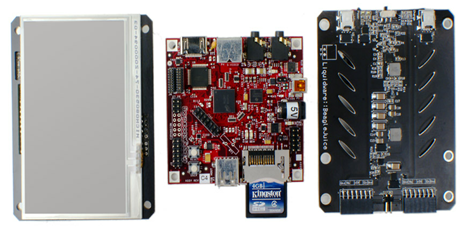
After a while, we had an “80%-finished”, 7” Android tablet that came in very handy as a starting point for custom tablet-related projects. I like to think of it as a “foundational technology”, but since that’s quite a mouthful, we decided to call it the Amber. This is the part where it looks like a tablet…
image
…And this is the part where it looks very…80%-finished.

The whole idea being that I want a starting point far enough along, so I don’t need to build everything from scratch, but not so far along that it’s a pain to customize.

The Amber is a 7” projected capacitive tablet driven by a 1 GHz, ARM Cortex-A9 OMAP3730 from Texas Instruments. We’ve customized a version of Android Gingerbread 2.3.4 to run on the Amber, and its 2 USB host ports offer high-speed USB and serial communications to a pretty wide range of devices. WiFi, Ethernet, cellular, and battery configurations are available as part of the Enhanced or Pro versions of the Amber.


I’ll be uploading more shots and tutorials of cool (and hopefully useful) things I’ve worked on with the Amber and Android development. Meanwhile, here’s a couple videos of the Amber in action:


Tuesday, May 15, 2012

Two ways to accelerate embedded development and build your application faster

Intel’s Core 2 Duo was one of the first mainstream desktop uses of a dual-core microprocessor (2005-6), and Nvidia’s Tegra 2 was an early dual-core appearance in mobile devices (2010).

Embedded development typically follows the progression of mainstream computing, with an approximate 5 year lag. Approximate, because dual-core ARM Cortexes (Cortices?) and Intel Core 2 Duos are quite different, and designed for different applications.

Even 5 years ago, though, personal desktop computers were quite powerful, and that power is now available for an incredible variety of dedicated or mobile applications.


As embedded technology becomes increasingly powerful, development efforts have had to accelerate to take advantage of these advances before they become obsolete.


Reconfigurable Computing

“Reconfigurable” can mean a couple different things. In one sense, you can talk about reconfigurable processor architecture – at the silicon level. National Instruments recently published its 2012 Embedded Systems Outlook, which presents the spectrum of silicon available to embedded systems developers:

image

However, “reconfigurable” can also refer to the design components involved. At the microcontroller level, Parallax and Arduino play host to a number of functional, modular components – reconfigurable for any variety of applications. With Texas Instruments’ line of high-performance embedded OMAP-family of microprocessors, the BeagleBoard platform provides a single-board computer base for assembling a custom handheld prototype.

The idea is off-the-shelf hardware is designed in such a way that the work is shifted to integration, and piecing the parts together – rather than building everything from scratch (more on that next time).


Toolchain Consolidation

Anyone who designs and develops embedded systems can tell you what its like at the start of a new project. Which version of which OS do we need to be compatible with? Is there anything from the lower levels that we’ll need access to in the final application? I happen to do a lot of work with Android, and getting each of these pieces in line for a new project is an effort in itself!


During the early design and prototyping stages, there’s also a great deal of component selection, each of which has its own drivers that probably need to be integrated into your kernel. And if you’re starting from a clean machine, get ready to spend a few days installing your favorite Linux packages, editors, compare programs, and kernels.

Much like the LAMP stack that goes into building a web server, I’ve built my own stack that comes in very handy when I start developing, then I saved it onto a VMWare slice that runs off an external hard drive (also known as the Android V-IDE). It’s similar to this, but I’ll update it every month or so with any new or useful packages that make my life easier. For the Windows users out there (I’ll confess I’m still hanging on), the other hack is to have a dedicated Linux netbook sitting around. Everything gets compiled on a remote server, but for testing different versions of an Android APK, it’s invaluable.

What are some of your favorite strategies to hit the ground running? Post a comment or e-mail me – justin at liquidware dot com

Tuesday, March 27, 2012

Android App Helps Blind Students Study Math

I thought I'd share this interesting Vanderbilt University MED Lab research. Jenna Gorlewicz has done an amazing job of demonstrating how an Android App she designed can help blind students study math.


From Medgadget News: Android App to Help Blind People Study Math

Thursday, November 17, 2011

Android Hardware Development Environment


My favorite part of the Android Hardware Development Environment is that I can easily connect to a serial port/ use the USB host capabilities with Android. When I'm done with my project I typically burn my custom image of Android to a microSD card so I can reuse my operating system!

Wednesday, June 8, 2011

Maker Faire 2011– Bay Area Recap

Each year, I head out to Maker Faire, thinking I’ve seen it all, but I know that can’t be true. And year after year…well, I haven’t been disappointed yet! Besides enjoying some quality time in the gorgeous California sun, we managed to get our project demos up and running for the event.

Here’s the booth, with Will and Francis doing some final setup work on the projects.

Testing the Projects

Of course, it wouldn’t be Maker Faire without Gerard’s Paella, which also makes for a great excuse to meet and mingle with some fellow makers:

Paella

By Saturday, we had a chance to deck out the booth with the RC “street view” car, affectionately named Zippy :)

Zippy with a Camera

The car had a PS3 Eye camera strapped on to stream video out onto the BeagleBoard and BeagleTouch, which was something I only dreamed of doing as a kid. DIY tech has come a long way since!

Speaking of DIY (and open source) tech, it’s pretty neat to see that the Arduino hasn’t lost any steam. Google put together an Android Accessory Development Kit that they were giving out.

Google Android Accessory Development Kit Box

It comes with an Arduino Mega-based board with an onboard USB host and USB OTG port, and the Accessory Demo Shield (bottom). The Accessory Demo Shield is especially neat…it’s like the ultimate controller/debugger shield, all in one. Buttons, relays, servo connectors, joystick and even a touch sensor! It puts a whole new spin on the kinds of Android/Beagle/Arduino projects I want to do…

Google Android Accessory Development Kit

Microchip and Digilent came out with a PIC32 that Mark shared with me. Pretty cool, since I can now drive all sorts of Arduino shields with a PIC controller…

Pic32 Uno

Pic32 Mega

Back at the booth, Will, Francis and I met a lot of hackers who stopped by to play around with the projects.

Android Demo

Francis

Each of us had a few moments to sneak away from the booth (in shifts) to wander through the Faire and check out what everyone else was up to.

I think this was the best country stage ever…the front porch if an old Western house.

CIMG6630 (Large)

A little steampunk and futuristic in a video-game kinda way, there’s nothing that stops you in your tracks like a robot sculpture that shoots fire. All I could say was…wow!

Robot that Shoots out Fire

And the most efficient four-wheeler ever- a new take on the tandem bike. I would love to have one of these, and maybe even mount an enclosure on this. I wonder what a cross-country road trip on this human powered car would be like. Probably fun and a great exercise :)

Most Fuel Efficient Four Wheeler

That’s all I pulled off the camera for now, and I’ll upload more pictures to Flickr when I get them. Thanks again to all the makers and hackers who stopped by, and I’ll be on the edge of my seat waiting for the next Maker Faire!

Thursday, May 19, 2011

I’m off to Maker Faire (2011 Edition)!

It’s that time of the year again! Some folks call in summer – I call it Maker Faire. So next week, I’m packing up a few of my favorite new projects, and hopefully show off something interesting at my table out in San Mateo.

One thing I’m really excited about is the stuff I’ve been hacking around with in Android. I always felt like Android was one of those hardcore engineering things, but I’ve been able to get it to work with the BeagleBoard and BeagleTouch to do some pretty fun stuff.

Last week, Will, and I were sitting in the lab playing around with the old RC car and some of Playstation cameras we had from a project last year. Will always thought it would be cool if we could control the car without having to follow it around, so we gave it a whirl. Loading up the car with a couple hacked PlayStation 3 cameras, Will was able to drive the car around the house without leaving the room.

By hooking up the PS3 camera to the car, Will and I were able to bring up the camera to the BeagleTouch and see exactly what the RC car was seeing. I’ve always wondered what it would be like to be driven around on a little RC car (think Honey I Shrunk The Kids :) and this is just about the closest I’ll get.  Using the same hack, I hooked up four PS3 cameras to the around my desk to make a “BeagleBoard Security System”, complete with split-screens and everything. It made me feel like a security guard/command-center operator of sorts, and plus, no one could sneak up on me.

Not to say I’ve forgotten all about the Arduino - I’ve also been playing around with a low power, portable, WiFi/GPS/Arduino rig with the GeoShield, which I’m going to test out at Maker Faire Exhibition Hall when I get there.

I had some spare time on my hands the past couple weekends, and some cooler gear to play with, so there’s plenty more projects I’ll have to show off. I’ll be there the whole time, and would love to say hi to some fellow West Coast hackers…see you there!

Wednesday, February 16, 2011

Android Platform Distribution

Thanks for all the emails and feedback over the last couple months on the Android Hardware Development kit, we're very excited to be using this advanced hardware platform. In fact, Matt has been busy hacking into nearly all our devices around the office that have exposed serial. Interestingly, Droid Does talk to quad CMOS sensor arrays to stream live video, but more on that later.

One of the common questions asked was: which version of Android does the Android Hardware Development Kit ship with?


The answer surprisingly turns out to be the in-line with the second most popular version on the market today, 2.1. This is great news because it shows a nexus of stable devices focused around Android 2.1 and 2.2 versions. This creates a stable base to upgrade from as the bleeding edge releases become more robust through aggressive software patch-work.

Current Distribution

The following pie chart and table is based on the number of Android devices that have accessed Android Market within a 14-day period ending on the data collection date noted below.


Platform
API Level
Distribution
Android 1.5
3
3.9%
Android 1.6
4
6.3%
Android 2.1
7
31.4%
Android 2.2
8
57.6%
Android 2.3
9
0.8%

Data collected during two weeks ending on February 2, 2011

From developer.android.com

Saturday, January 1, 2011

Happy Antipasto New Year!

Happy Open Source Hardware New Year!!!

Queue Lion King's theme song, the Circle of Life music... Elton John begins... rewind 15 years ago, I am a teenage boy living in Connecticut (not in the ritzy South-eastern part of CT, the farmlandish central/middle part). My parents both worked very late, so a family friend used to pick me up from school, and on the weekends, and teach and tutor me in mathematics in my spare time. Little did she know, many moons later, I would still find mathematics exciting, and constantly trying to apply it to my hardware hacking endeavors :-)

I'm home as I type this, and the irony is... my family friend sent a plate of antipasti for the holidays, and New Years. I couldn't help myself, I immediately placed the plate on top of my laptop, popped open the Liquidware website, and voila! Real antipasto meets Liquidware Antipasto Hardware Blog - the circle of life completes!
Delizioso!

The keen observer will notice the Java books on the right, and especially the Clojure book :-) I try to learn at least one new programming language during every holiday vacation - this time, it's clojure...

Friday, December 31, 2010

Introducing Antipasto Hardware Wiki

Over the past two months, Chris, Will, Nick, and I have stealthily upgraded and migrated all of the Liquidware wiki content over to a new wiki... the Antipasto Hardware Wiki.

I decided it was finally time to upgrade the wiki to a higher end system, and using pbwiki seemed like a pretty decent choice. It'll still take some time to finish the migration, but until then, the benefits are quite nice - the new wiki has a lot more features than the original Liquidware Wiki (which technically was an upgrade from the formerly-original wiki, over at the www.liquidware.org site, which doesn't even exist any more).

Not a big deal, but thanks for all the help - and hopefully this will help address all those emails about folks wanting more help finding reference specs and documents for Liquidware hardware.


Cheers!

Wednesday, December 29, 2010

Writing Hello World on the Android with Eclipse

I've gotten several dozen (!) emails in the past few days from DIY'ers, engineers, hackers, etc. asking for a very simple tutorial - a "hello world android" if you will. It then occurred to me that most of these emails are from people that just got an Android kit for Christmas (thanks to all the help from Matt and Will and Mike to get everything out the door in time).

So here goes. These instructions are summarized over at the wiki on this page.

Step 1: Install Eclipse
Download Eclipse Galileo-SR2 for Mac OS X-32bit  or Windows-32bit or Linux-Ubuntu-32bit, and install it to the desktop or some location inside Documents.

Step 2: Install the Android SDK
This is the trickiest step... Download Android SDK Tools for Mac OS X-32bit or Windows-32bit or Linux-Ubuntu-32bit, and extract the archive into the /eclipse/plugins folder. Open Eclipse, select Help > Install New Software... Click Add, in the top-right corner.When the Add Repository dialog that appears, enter the following:
  1. Name: ADT Plugin 
  2. Location: https://dl-ssl.google.com/android/eclipse/ 
  3. Note: If you have trouble acquiring the plugin, try using "http" in the Location URL, instead of "https" (https is preferred for security reasons).

Click OK and then in the Available Software dialog, select the checkbox next to Developer Tools. Click Next. Then click through to the end until you're done, and then shut down and restart Eclipse.

Then, click the Eclipse -> Preferences Menu, click the Android category, and browse for SDK location: /eclipse/plugins/android-sdk-2.1_r1. Click OK to apply, and the Target, Vendor, Platform, and API columns should have values, then click OK again.

Step 3: Configure ADB
If you're running on Mac, you're already done. If you 're running on Windows, you have to do a couple extra steps. First, download the SDK from Liquidware - this one is specifically designed to work with the Android DIY Starter Kit and the Android Hardware Development Kit. To install the USB driver, just plug a mini-USB cable into the BeagleBoards USB OTG port, and manually install the driver from your_sdk_path/google-usb_driver into rowboat gadget.
Step 4: Create an Android App
Select File->New Project, and click Android->Android Project. You have options at this point - you can "Create a new project in workspace" and call it whatever you want. This will make a "hello world" template application. Or! You can select "Create project from existing source", and select SkeletonApp. I recommend you do this, and select SkeletonApp. If that doesn't work, then try to default app.
 
Now, plug in Android, select the main source file (in the left panel, under src -> com.example.android.skeletonapp -> SkeletonActivity.java) and press the Go button (the Green arrow on the top line of the menu bar), and you're ready to go.


Step 5: Customize
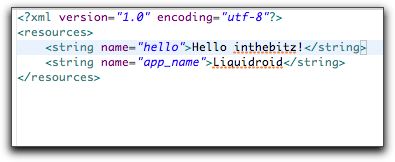
The most obvious thing to do is change the "Hello World" text. That's probably the safest way to go to start, just to make sure things are compiling properly. I've changed it to "Hello, inthebitz!" and voila - here it is, functionally working on the Android Embedded Hardware Development Kit:
Turns into this:

Bingo! Dino DNA!

Monday, December 27, 2010

Android vs. the Embedded Programmer Mindset

Eclipse Apps Roasting on an Open Android
ADB nipping at your serial bus.
Yuletide GUIs being compiled through XML,
And freakin' complicated data reference schemes that make you call even a single string from an outside standalone strings.xml file by @string/hello or R.string.hello.


Everybody knows a compiler and some global vars,
Help to make coding simple and fast.
Local functions with their scopes all aglo(bal).
Will find it much easier than dereferencing every gosh-darn string text variable.

What the helloworld, Google! Whatever happened to:

char gButtonText[] = "Option On";

function mytoggle( void) {
  strcpy(gButtonText,"Option Off")
}

Sure, it's ugly code. There's a better way to do it. But it's fast, easy, and simple, and intuitive to the C programmer's mindset. Welcome to the wonderful world of Java-inspired coding on Android. Everything is an object, and needs it's own varspace. Programming Android is like programming in Ruby on Rails' MVC stack. You aren't really writing a standalone app, you're just given the honor - and privilege if I say so - to glue on some function code on top of an existing framework. Programming Android is like programming Java - instead of thinking about building the app from the ground up, you're essentially writing a "diff" file on top of a massive mountain of existing code and functionality. The baseline app already does a bunch of stuff perfectly fine, thank you.

It's as if Android is constantly saying to me, "Oh, what, you want it to do something different? Overload my already perfectly-written function, why don't you. Pffft. I already thought of that. I have a better idea: why don't you *not* write your function, and instead use one of mine, and decrease the surplus population of crappy code!"

Bah humbugtracking
Programming in Android, like Java, I am constantly reminding of how little I know, because someone's already thought of that function, and it already exists - I just have to inherit and object and parent a class, @override a base class, and unprotect a final public method.

Want to make a toggle button change it's text? Duh:

android:textOff="Option Off"
android:textOn="Option On"

Herein lie the central difference in mindset between the Embedded Programmer and the Android Programmer:

Embedded (Arduino) Programming Mindset
In embedded land, we are trained to start from void main(void) and #include math.h and work upwards. From function control, application execution, to variable space definition, everything trains you to think about in a device-first mentality. You're thinking to yourself, "I have a device with XX megs of RAM, a YY MHz CPU, and a ZZ pixel screen." Optimization is the name of the game, efficiency matters, and resources are at a premium so it's worth taking the time to think them through.

Stretching the metaphor a bit for a minute, embedded coding is like heliocentrism - with the device at the center of the world:


Android Programming Mindset
In Android land, you are trained to start from a base, and extend some Activity class. You're writing diff code, pulling objects and their nested functions only when you need them. You are really writing *code*, you're just pulling and gluing together bits and pieces of functionality that were already written for you. The device doesn't matter, and why should it, because you're writing an app that might run on a tablet or a hand-held or an on-screen emulator. God only knows how many megs of RAM, CPU MHz, and pixels you'll have, so you'd better write your code abstractly and cross your fingers that it runs. Everything trains you to think about a user-first mentality.

All things considered, this isn't easy for an embedded programmer to embrace. Dare I say embracing and learning Android coding is the equivalent to the Copernican Revolution:


Device-first vs. User-first
Embedded programmers are more likely to build a new hardware device layer to push the performance envelope of a given piece of hardware. Android programmers are more likely to deliver a fantastic user experience that connects web-to-handheld-to-sensors first and foremost, and who cares if it sits and hangs for a few seconds while it calculates? The user will be stunned by the drop-shadowed jelly buttons, he won't even mind :-)

And the truth is... after several weeks of hacking my Android DIY Starter Kit, I don't mind either. I've found myself converting to a new religion, in the name of developing super-sleek looking GUI's in no time at all, it's really something. Doing the same in Linux would take weeks, maybe months (but that's another discussion for another time). Take my "void main( void)" from me, and give me my "public class extends Activity" any day of the week! But there are some downsides.

One major downside is the need for massively large reference manuals, or the need to constantly be connected to the web, for documentation, specs, and references. Try coding a rails webapp without access to the internet - impossible. On the other hand, all you need to code Arduino is a little cheatsheet - since you're essentially building everything up from scratch out of C primitive functions, all you need is the list of those functions. So what if you re-invent the wheel a few times? On Android, like Rails, you constantly need to know the top-down bigger picture. You need to have in your frame of mind the major high-level code objects, which you then reference down with the . dot-operator until you get to the method/function you were looking for. This means needing large amounts of documentation, and examples that are typically on the web.

Not better, not worse, mostly just different.