Showing posts with label BeagleJuice 2. Show all posts

Wednesday, August 22, 2012

Introducing the Dual-Core Android 4 Dev Kit for PandaBoard

With dual-core processors and Android 4 (Ice Cream Sandwich, at least) a mainstay of smartphones and tablets, some folks suggested it was about time for the Beagle Embedded Starter Kit and Android Hardware Development Kit to get a big brother…
image
After quite a few months of requests, Chris and I got Android 4 running on the PandaBoard, along with an HDMI adapter board and some drivers to get the PandaBoard a “DIY tablet kit” of its own.
image
image
Just as the name suggests, the Dual-core Android 4 Dev Kit consists of the dual-core OMAP 4430 PandaBoard, Android 4 ICS (with Android serial support), 4.3” touchscreen enabled, powered by a laptop-grade battery pack, so it can be remote mounted, portable, or just permanently charging with a backup power supply.
IMG_0274
The popular 4.3” BeagleTouch OLED display now works with the PandaBoard’s OMAP4430 with the help of a carrier board that conveniently brings the BeagleTouch pinouts to an HDMI connector.
IMG_0280
The other side of the PandaBoard sandwich is the BeagleJuice, 2nd Generation, providing smart, laptop-grade battery and power management capabilities to the PandaBoard’s 5V input jack.
I don’t think that a few extra wires ever frightened any readers of this blog (if anything, there probably aren’t enough random wires on these boards!), but it’s fresh off the lab, so some of these extra wires are going to be solidified as the boards ship.
Either way, I’m pretty pumped about having a portable display + battery setup that works with the PandaBoard, but also one that runs Android 4 (ICS) and takes full advantage of Texas Instrument’s dual-core OMAP4430 processor.
IMG_0276
One of the reasons I decided to make the panel remote mount capable (connected by wires rather than headers) is that the PandaBoard has a bigger footprint than the BeagleBoard, and a remote mount would allow the board and battery to be stored or mounted separately, much like most thin clients.
IMG_0286
Here’s a quick demo I just put together:
I think this would make a cool, totally overkill, touchscreen thermostat that I could shove in my wall, not unlike the Nest (who knew thermostats could be so sexy?), but until next time, post questions, comments and project ideas to comments, justin@liquidware.com, or tweet me @liquidware …image

Wednesday, August 8, 2012

Powering my Raspberry Pi with the BeagleJuice, 2nd Gen Battery

My Raspberry Pi finally showed up today! Naturally, an unboxing event was in order…

P1020679P1020680P1020681P1020682

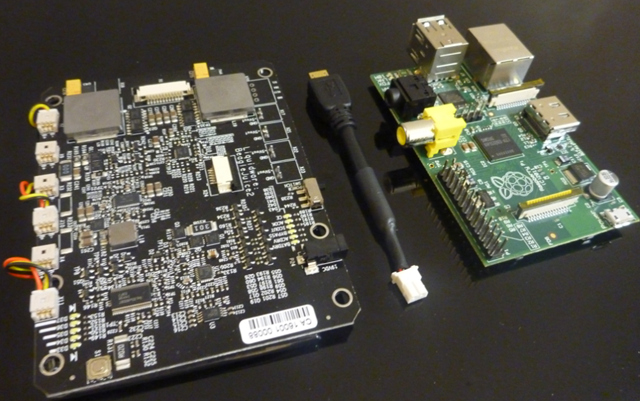
I haven’t gotten around to setting up my SD card yet, but I just wanted to see if it would power on with the BeagleJuice sitting on my desk. In theory, it should work, since the BeagleJuice outputs 5V from each of the 2-pin molex connectors.

image

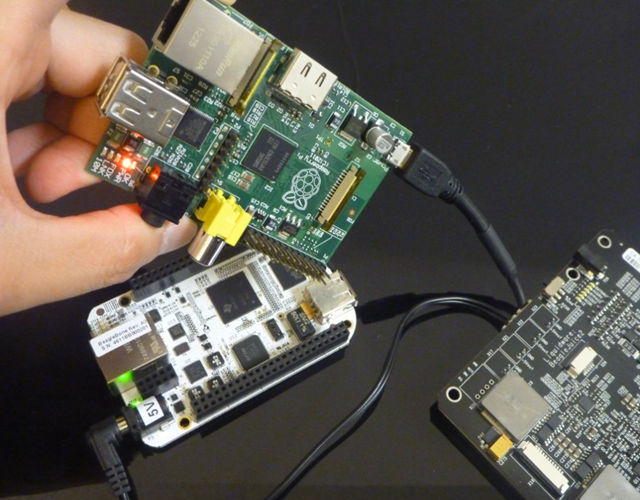
I took the micro USB cable that I spliced last week and plugged it into the Raspberry Pi…

image

…then I connected the other end to the BeagleJuice.

image

And voila! The Raspberry Pi powers on, as indicated by the red power LED next to the audio jack. Just for kicks, I plugged in the BeagleBone to the BeagleJuice as well (with a 5V barrel jack) to make sure they both run simultaneously, and they do :-)

image

Friday, August 3, 2012

3 Useful Things to Know about the BeagleJuice, 2nd Gen

I got a few very good questions about the BeagleJuice, 2nd Gen from earlier this week, so I thought I’d answer them in post form.

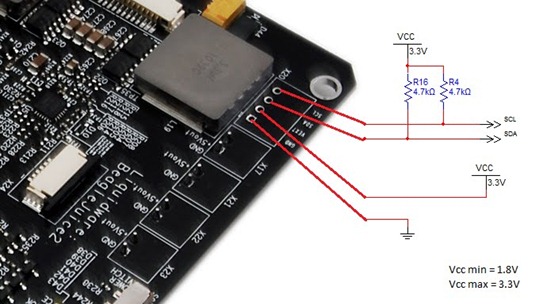
What are the specs on the I2C pins on the BeagleJuice?

The I2C pins (GND, Vext, SDA, and SCL) are exposed for custom headers or wiring. After bugging Chris several times, he decided to just draw me a schematic instead. The range of operation is 1.8V to 3.3V. Currently, there are drivers coded for Android/Linux and OMAP, but it could be hacked to anything that talks I2C.

BeagleJuice2 I2C Diagram

What else can I power with the BeagleJuice?

The BeagleJuice comes standard with the 2.1mm barrel plug, which works just fine with the 5V barrel jacks on the Arduino, BeagleBoard C5 and xM, PandaBoard, as well as the BeagleBone.

image

That said, it is in fact just a 2-pin molex connector at the end, so Matt spliced up his own USB micro cable, put some heat-shrink on the tip, and voila! The BeagleJuice now charges anything that takes 5V – my phone, or even the Raspberry Pi (when mine finally arrives!).

What’s with the strips of LEDs?

Aside from the fact that LEDs are always fun, they actually serve a purpose.

image

The ones on the left are battery charge status indicators, which were inspired by Chris’ Macbook Pro battery meter. (Sorry the picture is a little blurry – I tried to catch it as the lights were moving up!)

imageimage

There are a couple more “easter eggs” on the BeagleJuice, 2nd Gen – mostly holdovers from things Chris, Mike and I were working on here at the lab. Post your thoughts or guesses to the comments, or just send me a note – justin dot huynh at liquidware dot com

Monday, July 30, 2012

Introducing the BeagleJuice, 2nd Generation: Laptop-Grade Power Management for the BeagleBoard

Last week, I took a trip through some of the battery boards and power management systems we created for the Arduino, BeagleBoard and Amber. The development of the 2nd generation BeagleJuice was inspired mostly by requests for a “standalone Amber backpack”.
image
Sort of…I took a little artistic license with the picture above! The Liquidware Amber power supply and BeagleJuice, 2nd Gen were both built with advanced power management principles in mind.

(Edit: I got a few questions about this - the BeagleJuice, 2nd Gen comes with the standard 5V barrel jack cable to charge any 5V device that fits the jack, like the BeagleBone or PandaBoard. For the adventurous, it's not a huge stretch to wire your own cable to the 2-pin Molex connector...)

The 2nd Generation BeagleJuice is a modern, laptop-grade power supply that implements smart charging technology to manage multiple cells in series to deliver higher charge capacity, as well as high-power output. It’s optimized for 2-cell, 3-cell, and 6-cell configurations to deliver 2800, 4200, or 8400 mAh of capacity.
image
Onboard LEDs provide multiple status readouts as well as charge information. Advanced features can be accessed over I2C pins directly, or via a Zero Insertion Force (ZIF) ribbon connector. Here at the lab, I’ve used the 2nd Gen BeagleJuice as a primary power supply for several BeagleBoard units concurrently – which centralizes the power management system for remote installation clusters. The high-capacity BeagleJuice provides quad 5V outputs via discrete 2-pin Molex connectors.
image
I’ll cover some details on charging cycles in the next blog, but in addition to smart charging and power input management, the heavy-duty power supplies that the BeagleJuice is modeled after also focus on being fault tolerant and providing an added measure of battery preservation. This “safety” logic protects the battery from:
  • over current charge/discharge
  • over temperature charge/discharge
  • over voltage charge/discharge
  • cell charge/discharge imbalances
While no system is perfect, taking these issues into consideration is a big step closer to advanced power management and portable power supplies, useful for hobbyist and embedded prototyping projects with the BeagleBoard alike. Since the BeagleJuice, 2nd Gen comes with 2 5V barrel jacks connectors, it can actually power the PandaBoard and Arduino, as well as my phone with a custom-spliced USB connector. Here’s a quick shot of the new BeagleJuice in action:
This is Part 2 of 3 on portable power management for prototyping embedded systems. The next post will walk through some of the charging algorithms and explain some of the complexity around charge management ICs - justin dot huynh at liquidware dot com